Simple.
- If you haven’t added a Social Links Widget, now would be a good time.
- Download the G+ icons and choose the one you want.
- Under Website Management > Data & Media > File Storage > Upload Files, upload the icon.
- Get the icon’s URL, something like:

But you should use the relative URL in case you change the domain name sometime in the future:
storage/g-plus-icon-16×16.png
But this doesn’t work if you need the widget to be consistent across multiple pages with different URLs (like About Me and the homepage/root URL)…if anyone knows a better solution than absolute URLs, let me know 🙂
- Under Website Management > Members & Accounts > Member Accounts > (Select your account) > Social Profile, add the following:
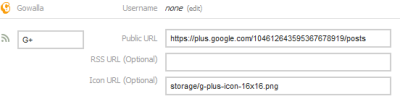
- Congratulations – just remember to verify you got it right 🙂


Thanks +Sean McGabe of Bold Perspective for the free Google+ icons.
http://boldperspective.com/2011/free-google-plus-icon-vector/
 Peter Johannes Schmidt